

Previews
When you cursor a file in any mode, the preview pane renders it at the fidelity appropriate to its type. The backend first asks the Julia kernel: a FileType plugin claims the path with matches and returns a PreviewPayload from preview. When no plugin claims it, the backend reads the file itself; that is how raster images and plain text are served. The payload's mime tells the frontend which renderer to use. Adding a format is a Julia-only change — see The Dispatch ABI and Writing a FileType Plugin.
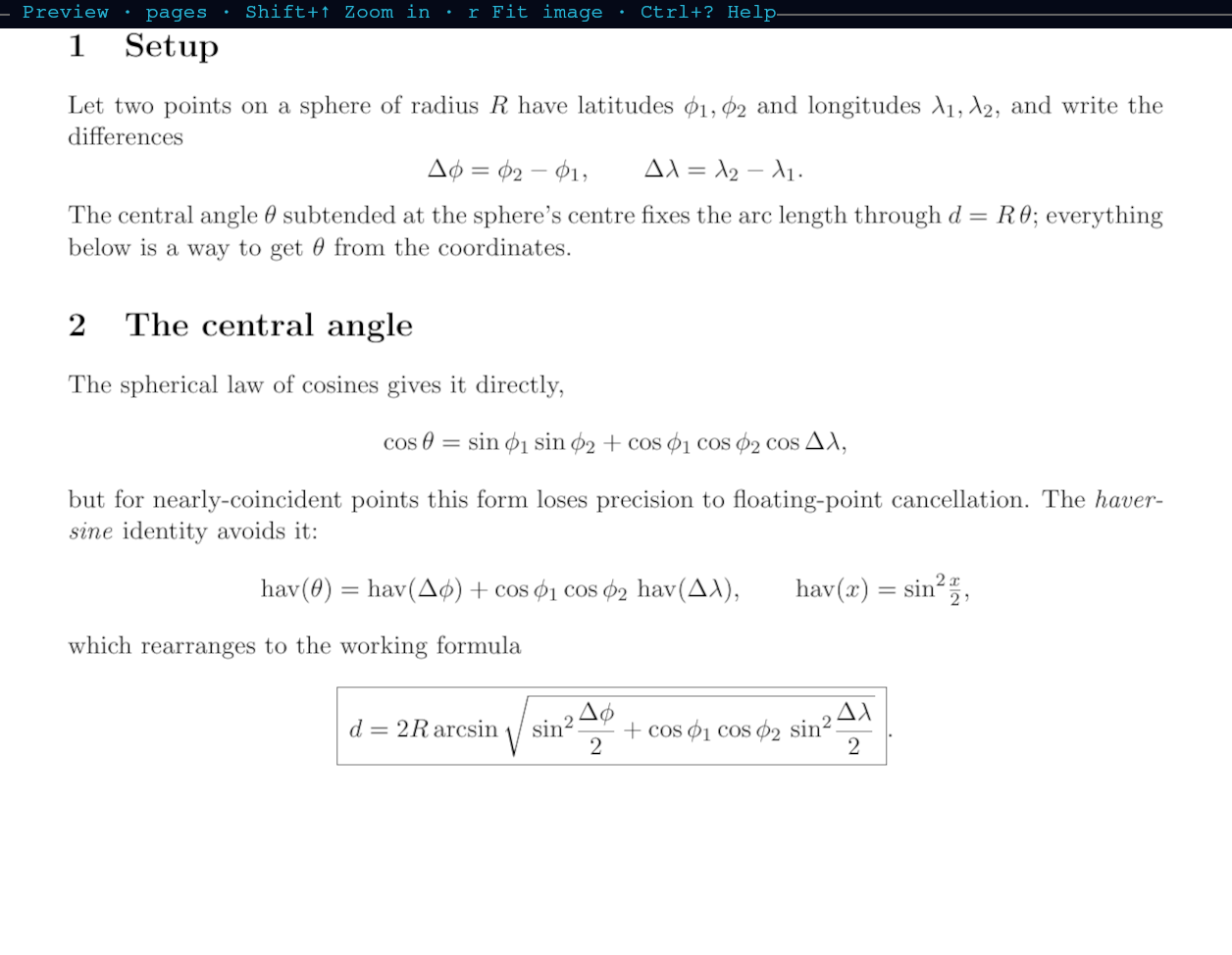
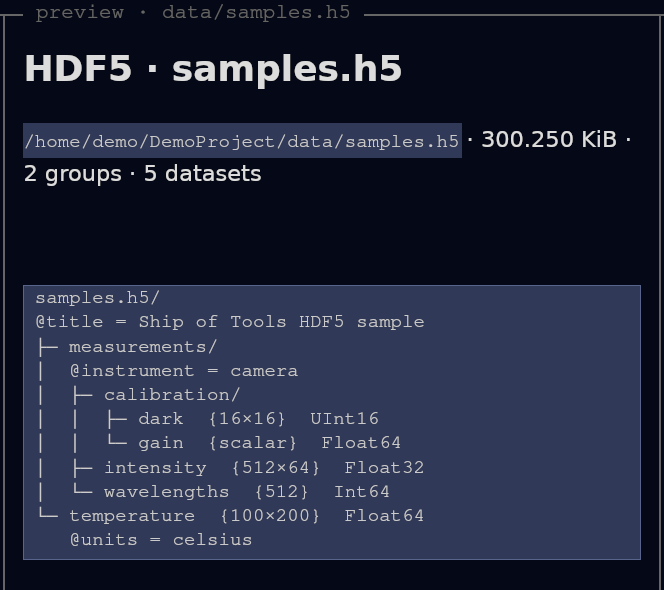
Built-in file types
These plugins ship under julia/plugins/ and the kernel loads them at startup. Each is a built-in that travels the exact same dispatch path a third-party plugin would.
| Extension | Representation | Fidelity |
|---|---|---|
.jl | token spans (kind + text) from JuliaSyntax.jl | syntax-highlighted source, no client-side re-tokenizing |
.md, .markdown | raw UTF-8 bytes | rendered markdown (comrak + cosmic-text), including inline math |
.toml | raw UTF-8 bytes | code/text renderer |
.json | raw UTF-8 bytes | plain text today (pretty-print / color planned) |
.txt | raw UTF-8 bytes | plain text renderer |
.pdf | one poppler-rasterized page | paged; n/p turn pages with the preview focused, rasterized backend-side to fit the pane |
.mp4, .webm, .mov, .mkv, .m4v | a single ffmpeg poster frame | still poster in the pane; o opens playback in the browser |
The plugin module and MIME type behind each row are listed under Built-in preview plugins.
PNG (and other raster images) render directly through the frontend's image quad path — the same path the PDF and video plugins reuse by returning image/png. SVG and .svgz also render in the pane.
Text over 512 KiB, or bytes that look binary, show a one-line summary (large file — N bytes. Not previewed as text) instead. The backend itself truncates text at 2 MiB and refuses binary over 512 MiB with a note.
A few notes on the table:
Julia source is tokenized on the kernel side into
{spans: [{text, kind}]}, so the frontend colors it without parsing Julia. The token kinds map to the frontend's color set (keyword,comment,string,number,op,punct,type,ident,text); concatenating every span reproduces the file byte-for-byte.PDF is the one format whose preview takes a page parameter — the only built-in that addresses which part of a file to render. Pages rasterize on the host where the file lives (poppler's
pdftoppm/pdfinfo), matching the backend-side-decode model.Video deliberately does not play in the pane. A native player (HTML5
<video>with hardware decode) beats streaming decoded frames over a socket, so the pane shows a poster andopops the real file out to the browser.
When an external tool is missing (ffmpeg for video, poppler for PDF), the plugin returns a text/markdown note explaining the gap — never a silent blank pane.
Opens in the browser, not the pane
Some formats are interactive HTML and belong in a real browser rather than a static pane. Consistent with the video policy, these are served by the daemon's page server and opened in the OS browser, local or remote, rather than rendered in-pane.
o on the cursored or previewed file opens it in the right tool:
HTML (
sample.html) — opened in the browser, with the figure and movie beside it served by the daemon's page server.Pluto notebooks (
pluto_demo.jl,pluto_demo2.jl) — opened as live Pluto sessions in the browser. As.jlfiles they still get a syntax-highlighted source preview in the pane.Quarto documents (
quarto_julia.qmd) —orenders without running code and opens the result in the browser,Shift+Orenders with code execution; the source previews as text in-pane. On Linux the Julia engine server a render starts ends when the backend daemon ends; aquarto renderof your own that found and reused that server (Quarto finds it throughXDG_RUNTIME_DIR) starts a new one after that.
Shift+W opens the built documentation site for the file. These all follow the same "rich/interactive content lives in the browser" policy. The example files named here are in examples/preview/ of the release checkout ($SOT_MANUAL/examples/preview/).
Data on a mounted share
A page can also show data that lives outside its repo. When the repo tracks a symlink to a folder on a mounted share or drive, images and movies on the page load through that link, and movies seek; nothing needs to be declared. A link is followed only when:
git tracks the link (
git addit and reload);its target is written as an absolute real path under
/mnt,/mediaor, on macOS,/Volumes, asln -s /mnt/<share>/... <name>does: a relative target, or one that runs through another link or a.., is refused;no symlink lies below the link, on the way to the file (the file served is the target joined with the names below the link, at any depth);
the file is not in your home folder, the repository,
.gitor a folder inside them (in any letter case), and no folder or name below the mount folder on its real path starts with.(a link itself named.datastill serves);the file exists on the computer whose daemon serves the page (is its share mounted?) and does not change while it is being opened.
Anything else is refused with a message saying why, which the browser shows when the missing file is opened in a tab of its own. A repo file outside the page's site folder (the outermost folder above it, within its repository, that holds an index.html) is refused too. On macOS, following a link needs git, which means the Command Line Tools; the daemon picks up tools installed later at its next restart. On Windows no link is followed, so a page there never shows linked data.
Pan and zoom images
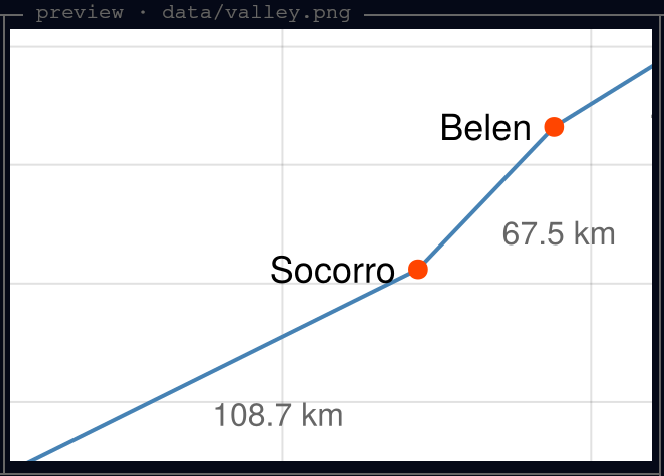
With the preview focused (Primary+ArrowRight; ⌘→ on macOS), = zooms an image in and the arrow keys pan it. Same-size images in a directory share zoom and pan, so stepping through a run's plots keeps your framing.
Capturing a preview region for the LLM
For raster image previews you can zoom in, then, with the preview focused (Primary+ArrowRight), press c to crop the visible region from the source image on the backend. The crop is written to <project>/.sot/captures/<name>-roi-<stamp>.png, and the frontend pastes a "Look at this cropped region ..." line naming the source and the crop into the agent pane, unsent, and moves focus there. Add your question, such as "what's the artifact here?", and press Enter. The agent sees exactly the region you are looking at.
Formats added by external plugins
File types do not have to be built-in. The HDF5 worked example ships as a separate package and claims .h5 (see the sample.h5 fixture) with no Rust changes. It is a dependency of the kernel's environment and is registered in the kernel's lazy-load table (LAZY_PLUGIN_FOR_EXT), which loads it on the first .h5 preview.
Adding a new file type
A FileType plugin is small: a subtype, a matches predicate, and a preview that returns a PreviewPayload with the right MIME.
module CsvPreview

using ConceptExplorerCore

struct CsvFile <: FileType end

ConceptExplorerCore.matches(::Type{CsvFile}, path) =
    endswith(lowercase(path), ".csv")

function ConceptExplorerCore.preview(::Type{CsvFile}, path)
    lines = readlines(path)
    ncols = length(split(lines[1], ","))
    table = String[]
    for (i, line) in enumerate(lines)
        push!(table, "| " * replace(line, "," => " | ") * " |")
        i == 1 && push!(table, "|" * repeat(" --- |", ncols))  # header rule
    end
    PreviewPayload("text/markdown", Vector{UInt8}(join(table, "\n")))
end

end
The plugin runs in the kernel, not in your REPL: add the package to the julia/kernel environment (Pkg.develop or Pkg.add), then add it to the kernel's using list or map its extension in LAZY_PLUGIN_FOR_EXT. Today that works only from a source checkout. No Rust change is needed. See Discovery for what loads today. For the full contract and discovery rules see The Dispatch ABI and Writing a FileType Plugin.