

Running several agents
Ship of Tools is built for more than one agent at a time. Every session is a row in Sessions mode: a project directory with its own Julia REPL and an agent pane running Claude Code, Codex, or a bare shell (see Hosts, sessions, REPLs). You move between rows from the keyboard, and each row's color tells you whether it needs you.
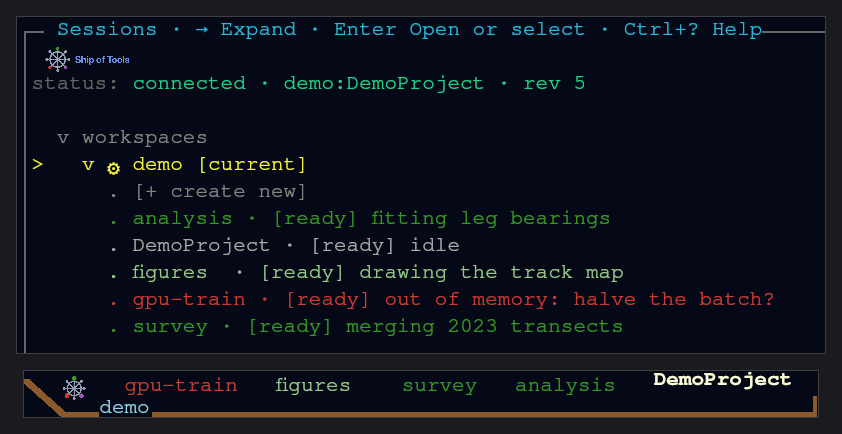
Start a session
Press s for Sessions mode and pick [+ create new]; the steps are in Start an agent session.
The daemon starts the agent in its own supervised capsule, so it keeps running when you switch rows or lose the connection, and when you close a window on a computer that does not run the backend. Closing the last window on the computer that runs the backend ends its sessions unless you answer Yes to the Ctrl+Q prompt; see What keeps running.
Move between sessions
| Key | Action |
|---|---|
s | Sessions mode — every row on every connected host, grouped by host |
Shift+ArrowRight / Shift+ArrowLeft | cycle the active session from anywhere |
Primary+Arrow | move focus between panes inside the session |
Switching rows is a frontend state change: it never restarts a session's REPL, so the REPL holding x = 5 still holds it when you come back.
Read the colors
Each row is colored by the agent's work state, so you can scan the list instead of tabbing through each pane; the colors are in Work-state colors. All keys are in the keybindings reference.
One worktree per agent
Parallel agents on one repository should not share a checkout. The bundled worktree skill (/worktree in a Claude Code session, backed by comm-worktree-new.sh <short>) creates a git worktree next to the repo and spawns a new session bound to it:
directory
<repo-parent>/worktrees/<repo>-wt-<short>(never inside the repo),branch
wt/<short>off the currentHEAD,a session labeled
<repo>-wt-<short>(a committed.sot/worktree.tomldisplay_prefix, or--display-prefix, replaces the repo name in the label), listed next to the parent row.
/worktree status shows the family and whether each worktree is ready to clean up, /worktree sync reminds the parent and worktree sessions to sync, and /worktree clean tears a finished one down. The same scripts (comm-worktree-new.sh, -status.sh, -sync.sh, -clean.sh) live in ~/.sot-comm/bin for use from any shell.
Hand work to a new agent in another repo
comm-spawn.sh <repo-path> --task "..." starts a new agent session on another package and has it report back to you over the comm relay. Combined with agent messaging, one session can fan work out to several others and collect their answers.
comm-spawn.sh <repo-path> --agent none starts a shell row instead, with no agent: it prints the row's workspace id and the comm-despawn.sh command that ends it. A row made this way appears in the session strip without moving the window off the row you are on.
A separate subscription per session
A session runs under the agent's default login unless you pick another account folder in the session picker; rows running under one show a · <name> suffix. How to add an account is in Modes.