

Ship of ToolsAn agentic development environment for Julia
You and the agent share one Julia REPL; figures render in the window; sessions keep running on the server.
You and the agent share one Julia REPL; figures render in the window; sessions keep running on the server.

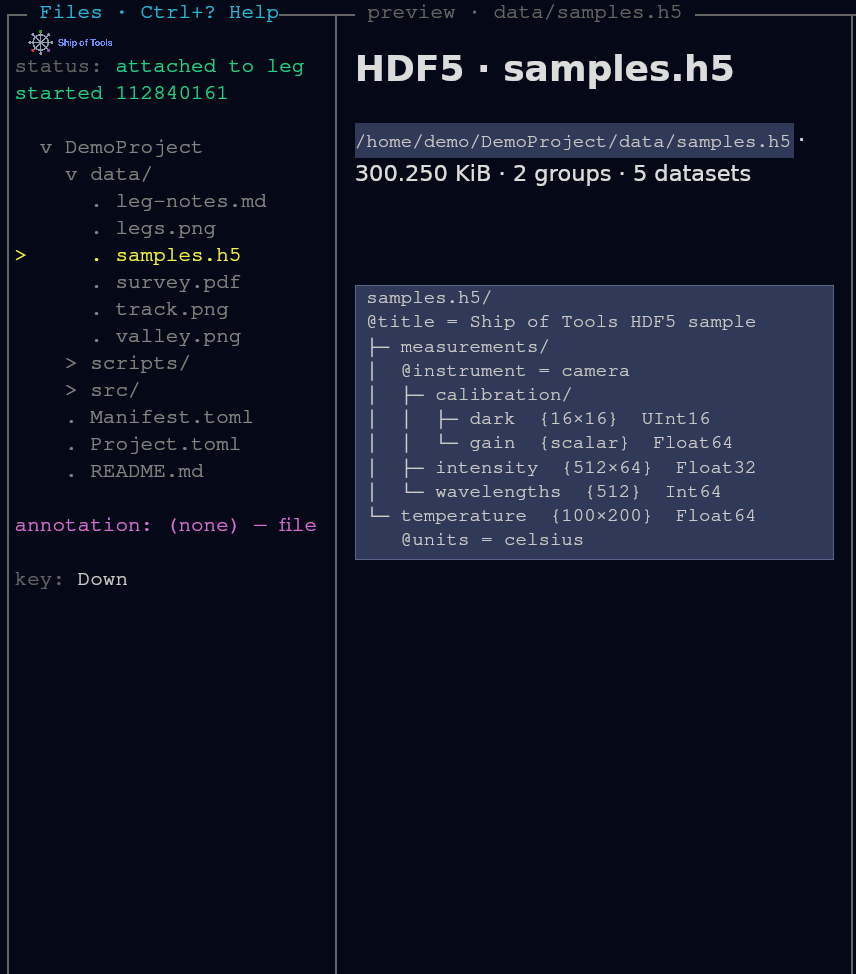
A desktop window, drawn on the GPU, with a keyboard-driven layout: a navigation tree, a file preview, an agent pane, a Julia REPL drawer and, along the bottom, the session strip. The status:, annotation: and key: lines around the tree are plain readouts; The interface says what each shows.
CairoMakie figures appear inline; interactive WGLMakie figures and Pluto notebooks open in your browser. Because the window draws all of this itself, it needs a graphical desktop, not a terminal. Linux; Windows and macOS run as frontends to a Linux backend (macOS is experimental). See Platforms.
Every agent session is a row in Sessions mode, on this machine or on any connected host. The row color is the agent's work state, so you can see which session needs you without opening each one. Shift+Right / Shift+Left switch sessions; each session keeps its own Julia REPL, and switching never restarts it.
![Demo session rows changing color as a script sets their work states: green working, red waiting for your answer, purple waiting on a job, blue done, gray idle. Each row's [ready] tag means its session process is up. Under the rows, the session strip shows the same colors.](/ship-of-tools/stable/assets/sessions.RlFceyE0.png)
The navigation pane is a tree whose root you switch with one key: f for files, m for modules and their definitions, s for sessions, h for hosts. The preview pane renders the entry under the cursor: markdown with typeset math, paged PDF, images, HDF5 structure, syntax-highlighted Julia.
The backend runs where the data and GPUs are; the window runs on your laptop or desktop and attaches over SSH. Sessions, REPLs and agents keep running on a remote server when the lid closes or the window restarts (closing the window ends the sessions of a backend on the same computer, not those of a remote one), and several windows can attach to one backend. See Going remote.
A preview for a new file type is a Julia plugin: a FileType subtype with a matches method and a preview method, with no Rust changes. This one shows a CSV file as a markdown table. The built-in text, source, PDF and video previews use the same interface. A plugin is added to the kernel's own environment in a source checkout; nothing discovers a package of yours by itself (see Discovery). The HDF5 preview tutorial shows one.
struct CsvFile <: FileType end

ConceptExplorerCore.matches(::Type{CsvFile}, path) = endswith(lowercase(path), ".csv")

function ConceptExplorerCore.preview(::Type{CsvFile}, path)
    # ... build a PreviewPayload of "text/markdown" from the CSV rows
end
The walkthrough is Writing a FileType Plugin.
Frontend and backend together on one Linux machine. For a remote backend (install and enroll the backend first: the hub's hosts.toml must list this machine), a second frontend or Windows, see Going remote and Install details, which also lists what the installer writes and how to remove it. What it touches:
~/.local/share/sot, plus user lingering so the backend keeps running after logout on Linux.~/.claude and ~/.codex; a skill of yours with the same name as a shipped one is overwritten without a backup.No isolated mode yet: try it under a separate user account or in a VM. See What the installer changes.
curl -fsSL https://raw.githubusercontent.com/kalidke/ship-of-tools/main/scripts/install.sh | bash -s -- --localOr ask a coding agent on the target machine:
Install Ship of Tools: fetch https://raw.githubusercontent.com/kalidke/ship-of-tools/main/docs/INSTALL-AGENT.md and follow it.Status: in active development.