

Modes
A mode is a switchable root for the navigation tree. Every mode has the same shape — a parent → current → children hierarchy shown as a collapsible outline — and a hotkey swaps which tree fills it. Cursor position is preserved per mode across switches, so jumping from Files to Modules and back lands you exactly where you left each one.
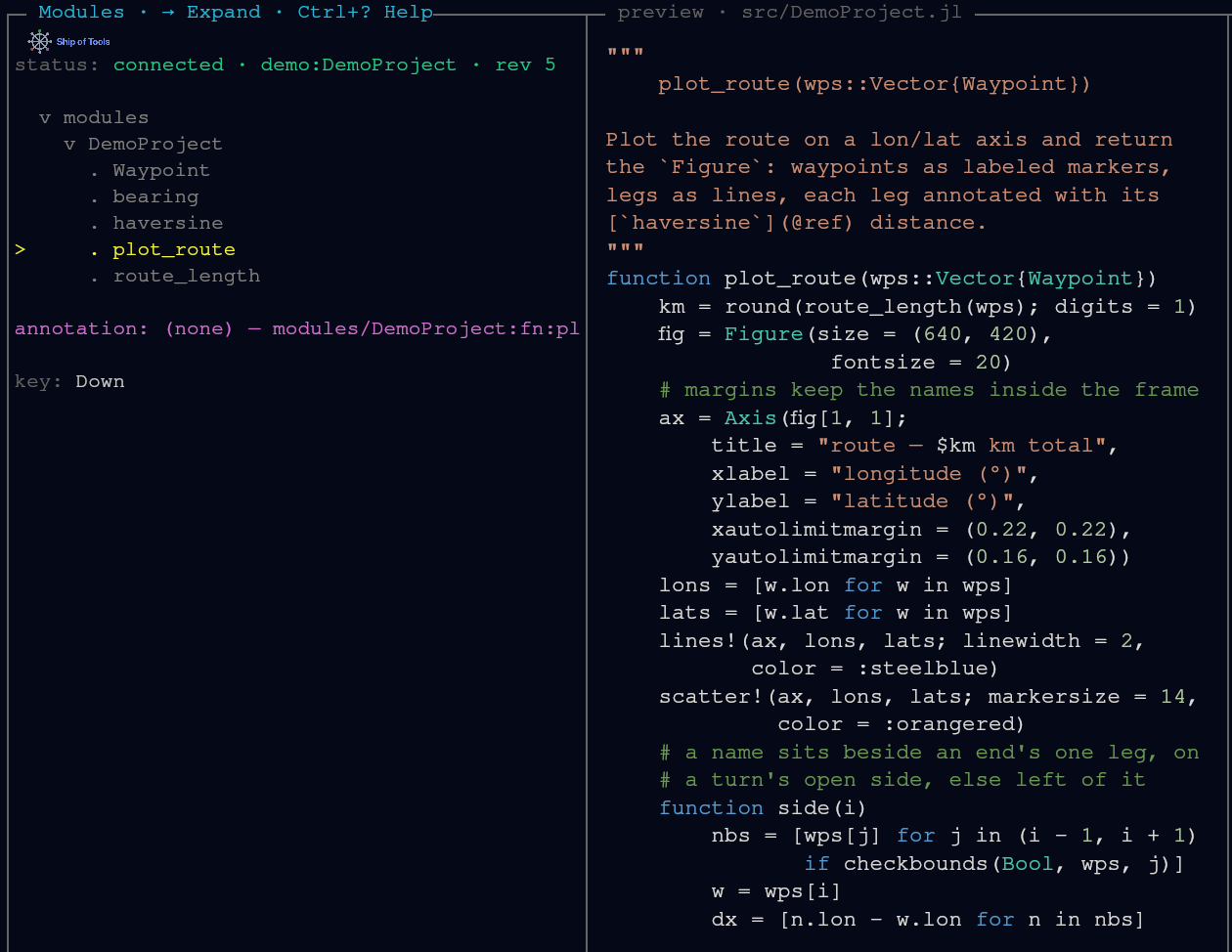
Modes are a planned plugin surface: the design is a Mode subtype with tree_root / tree_children / preview_for methods adding a new root, and the core modes shipping as methods on that same type with no privileged path. Mode is declared in core and NOT BUILT. Today the nav roots are fixed native Rust views in the frontend (Files, Modules, Sessions, Hosts), not Mode subtypes: Files, Sessions and Hosts are built in Rust, and only the Modules tree comes from the Julia kernel. The mode-plugin seam is not wired. See The Dispatch ABI and Writing a Mode Plugin.
The same shape everywhere
The window's navigation pane is a single collapsible tree: a parent context, the current level, and its children, shown through nesting. What changes between modes is what the tree enumerates and what the preview pane shows for the cursored node.
| Mode | Level 1 → Level 2 → Level 3 | Preview |
|---|---|---|
| Project | Sections → contents → subitems | Rendered markdown / task detail |
| Files | Parent dir → current dir → contents | File at appropriate fidelity |
| Modules | Modules → types, functions, macros, submodules → constructors | Definition source + concept artifact |
| Types | Types → facets (fields/methods/sub) → members | Type def + meaning + data shape |
| Math | Concept areas → concepts → derivations/impls | LaTeX + implementing functions |
| Outputs | Recent runs → contents → artifacts | PNG / plot / JSON / MP4 |
| Agents | Tasks → timeline → step detail | Diff / live tail / message |
This table is the conceptual mode set — the design target. Not all of it is built yet; see the status breakdown below.
Built today vs planned
| Mode | Status |
|---|---|
| Files | Built. Filesystem navigation with previews. |
| Modules | Built, read-only. Structural view derived from JuliaSyntax.jl. |
| Project | Planned, not built. |
| Types | Planned, not built. |
| Math | Planned, not built. |
| Outputs | Planned, not built. |
| Agents | Partly here. Multi-agent is real today — concurrent Claude Code sessions coordinated over the comm bus and surfaced in the Sessions view. What is pinned for later is this dedicated mode: an in-UI tasks → timeline → step-detail view for orchestrating them. |
The conceptual set above describes where modes are going. What you can switch between today is the set of operational nav modes bound in the keymap, below.
The nav modes bound today
The frontend binds four navigation modes. Each is a single-character chord that is active only in navigation focus — in the pty panes, the editor, or a prompt, those characters stay literal text.
| Key | Mode | What it roots the tree at |
|---|---|---|
f | Files | the project filesystem |
m | Modules | modules and their definitions (types, functions, macros and submodules), read-only, from JuliaSyntax.jl |
s | Sessions | workspaces on every host the window is connected to, grouped by host |
h | Hosts | the remote hosts you can target |
Files and Modules are the two conceptual modes wired up so far. Sessions and Hosts are operational modes — they navigate the deployment surface (which project, which machine) rather than the concept hierarchy of a single project.
Sessions mode (s)
Sessions mode lists the workspaces on every host the window is connected to, grouped by host, and lets you commit a new one. The session picker uses three chords on the cursored directory:
| Chord | Action |
|---|---|
Enter | Create a workspace with a Claude Code agent. |
Ctrl+Enter | Create a workspace with a Codex agent. |
Shift+Enter | Create a workspace with a plain shell and no agent. |
One backend daemon hosts one Julia kernel per workspace, routed by workspace_id, so switching workspaces is fast and does not tear down the kernel. You can also cycle the active workspace directly with Shift+ArrowRight / Shift+ArrowLeft.
Accounts
A session normally runs under the agent's default login. To spend a different subscription — a team account, say, kept separate from your personal one — add an account outside Ship of Tools first:
mkdir -p ~/.claude-auth/team
CLAUDE_CONFIG_DIR=~/.claude-auth/team claude
# then, inside that claude session: /login
Once that subdirectory exists it appears as a choice in the session picker (Tab cycles it) — Ship of Tools discovers accounts, it never declares or creates them, and it never stores a credential of any kind. A subdirectory you haven't logged into yet still shows up and is still selectable — the row's own pane runs the login on its first start. Sessions running under a non-default account show a short · <name> suffix in the Sessions list so you can tell at a glance which subscription each one spends.
An account folder holds only its own login and Claude's own per-account runtime state (sessions, caches, and the like). Everything else — CLAUDE.md, settings.json (hooks, permissions, model, status line), agents, commands, skills, plugins, output-styles, per-project memory (projects), and prompt history (history.jsonl) — is shared with the default folder: on the first session in a new account, the daemon links each of those entries in from ~/.claude, so the account starts with the same instructions, hooks, and history as the default login. An entry already present in the account folder — created by you, or from an earlier session — is kept as is and overrides the shared one; to use the shared one instead, remove the account's own copy. The comm hooks are the one exception: every install and update also merges them into an account's own settings.json, so a session in that account still reports its work state. User-scope MCP servers live with the per-account state, so add them separately for each account you want to use them from.
On Windows, a symlink needs Developer Mode or the symlink privilege, and a standard desktop user has neither. Where the daemon cannot make a symlink, it shares each folder through a junction, which needs no privilege, and checks that it can read through it; if it cannot, it removes the junction and the session does not start, naming the reason. CLAUDE.md, settings.json and history.jsonl become copies, made once at the account's first session and its own after: later changes to the default's file do not reach the account, and the account's do not reach the default (a file the default lacks is not created). Two limits follow. A junction made by a non-administrator cannot be crossed by a process that enforces redirection trust, such as an ssh session on a host that sets it for sshd.exe or a process a system service starts; the desktop does not enforce it. And a junction works on a local NTFS or ReFS volume only. To share the three files by symlink instead, an administrator turns on Developer Mode (Settings, System, For developers; a standard user cannot), and then, with no session running in that account and after saving anything you want from its copies:
$acct = "$env:USERPROFILE\.claude-auth\team"
foreach ($n in 'CLAUDE.md', 'settings.json', 'history.jsonl') { Remove-Item -LiteralPath "$acct\$n" -ErrorAction SilentlyContinue }
The next session in that account links each file the default folder has. The folders keep the junctions already made, with the same redirection-trust limit. Without an administrator, the copies stay the account's own.
An account name is lowercase letters, digits, -, and _ only, and must start with a letter or digit — team, team-2, and a_b all work, Team and ../etc do not.
Only Claude rows use accounts. A Codex row (Ctrl+Enter) or a plain-shell row (Shift+Enter) is refused while a named account is chosen in the picker: choose the default account first.
Hosts mode (h)
Hosts mode lists every daemon host the frontend is connected to. The frontend dials every daemon host declared in hosts.toml at once, so each row shows whether that host is connected or unreachable, or, when its daemon answered and refused this window, why (daemon out of date for a daemon still running an older version than the window speaks), tagged [current] for the host you are working on and [default] for the first connection. Enter on a host moves the Sessions view to that host's group; there is nothing to relaunch.
The mode keys are plain single characters, so they are scoped to navigation focus: typing f into the REPL or the editor inserts an f. Pane focus, layout and drawer chords are in Keybindings. On macOS, Ctrl in the chords on this page is ⌘ (Primary).